Access and security
Who may see what is decided on the server
Access rules sit next to the fields they protect, and the server checks them on every request. Sign-in, two-factor and single sign-on are built in, and an admin decides which methods count.
Early accessSign up with GitHub or email. Your first app is live in a few minutes. Plans from €0.99 a month.
Or self-host it for freeimport { defineRoles, f, resource } from '@protobase/schema'
export const roles = defineRoles({
admin: ['*'],
desk: [
'work_orders.read', 'work_orders.create', 'work_orders.update',
'money.read',
],
mechanic: ['work_orders.read.own', 'work_orders.update.own'],
})
export const workOrders = resource('work_orders')
.table('shop.work_orders')
.fields({
id: f.integer().readOnly().filterable().sortable().dbDefault(),
assignee: f.text().filterable(),
task: f.text(),
status: f.enum(['open', 'done']).default('open').filterable(),
// Only roles holding money.read see the price of the labour.
labour: f.decimal({ precision: 8, scale: 2 }).access({
read: roles.can('money.read'),
update: roles.is('admin'),
}),
})
.primaryKey((r) => r.id)
// .own capabilities match the rows assigned to the signed-in user.
.owner((r) => r.assignee)
.access({
// A finished work order is closed, checked against the stored row.
update: roles.can('work_orders.update').and(
(_ctx, record) => (record as { status: string }).status !== 'done',
),
delete: roles.is('admin'),
})Access rules
Rules in the description, not in each screen
This is the docs’ example for the bike shop’s work orders: the desk sees prices, mechanics see their own work.
- Roles are bundles of capabilities such as
orders.read.ownorcosts.read, and several roles add up. - Rules work per operation (list, read, create, update, delete), per field and per row. A row rule is a filter, like row-level security.
- Field lists are allowlists, so a column added later stays hidden until someone lists it.
- Once you define roles, anything not granted is denied. Without roles, everyone who can sign in may do everything.
Enforced everywhere
One set of rules for every screen and every call
- In the REST API, in every block of a composed page, and in the API description and screen models each user receives.
- A resource someone may not see answers 404 everywhere, and a hidden field is refused exactly like a field that does not exist.
- Error messages leave hidden values out.
- Permissions come back with each record, so buttons someone may not use show as disabled, with the reason.
- Tools you give the assistant act as the user, through the same rules.
One exception, stated in the docs: the open-source assistant’s two built-in SQL tools run as the app’s database role, outside the access rules and tenant scoping. Only users with the admin or ai role see the assistant, and a write runs only after someone approves it.
Sensitive fields
Masked until someone asks, and every look is logged
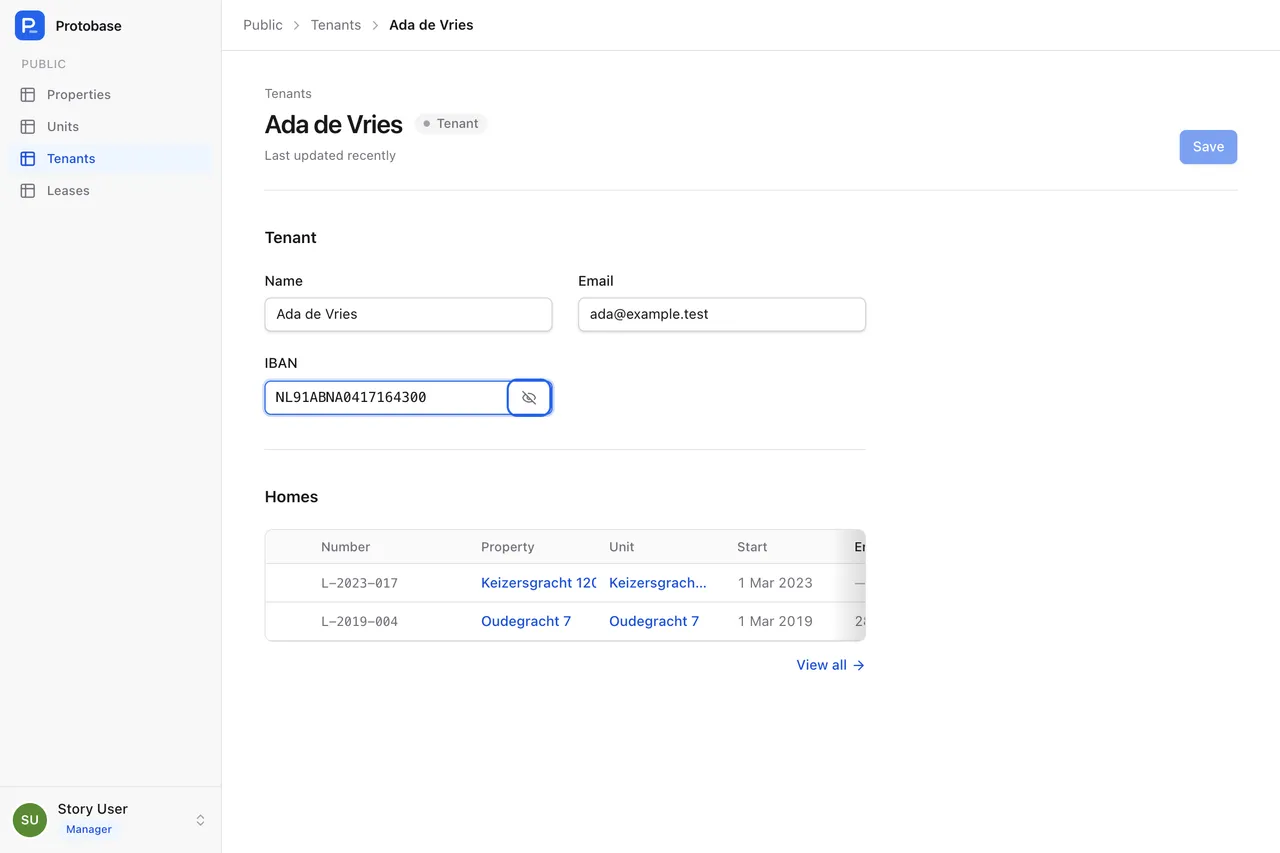
Mark a field such as a bank account number as sensitive, and it never appears in lists, responses or search. The record page shows it masked with an eye button; revealing it asks the server for that one value and writes an audit event.
Public access
A public site on the same data
An anonymous role can read the fields you list and nothing else. Writes, wildcards and tenant-scoped resources are refused when the server starts. The property portal example works this way.
Sign-in
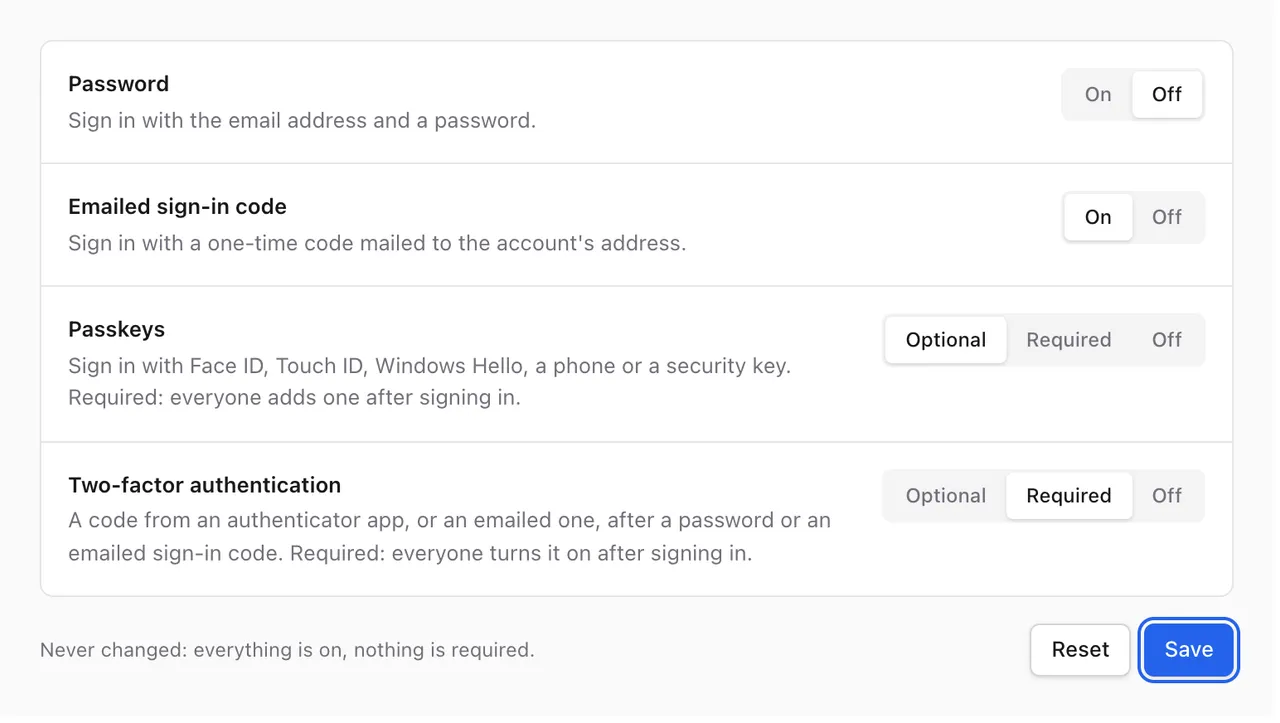
Every common way to sign in, switched on by policy
There is no setup page on the web: the first admin is created from the command line, so a fresh address cannot be claimed by whoever finds it first.
Password
At least 12 characters, with reset by an emailed link that works once, for an hour.
Emailed code
A six-digit code that works once, for five minutes.
Passkeys
Face ID, Touch ID, Windows Hello, a phone or a security key.
Two-factor
An authenticator app with ten backup codes, or an emailed code, and “trust this device” for 30 days.
Single sign-on
Any OpenID Connect provider, with recipes for Dex and Keycloak, and sign-in with GitHub.
Sign-in policy
Admins switch each method on or off, and make passkeys or two-factor optional or required, with a history of who changed what.
Organizations
Several organizations in one app
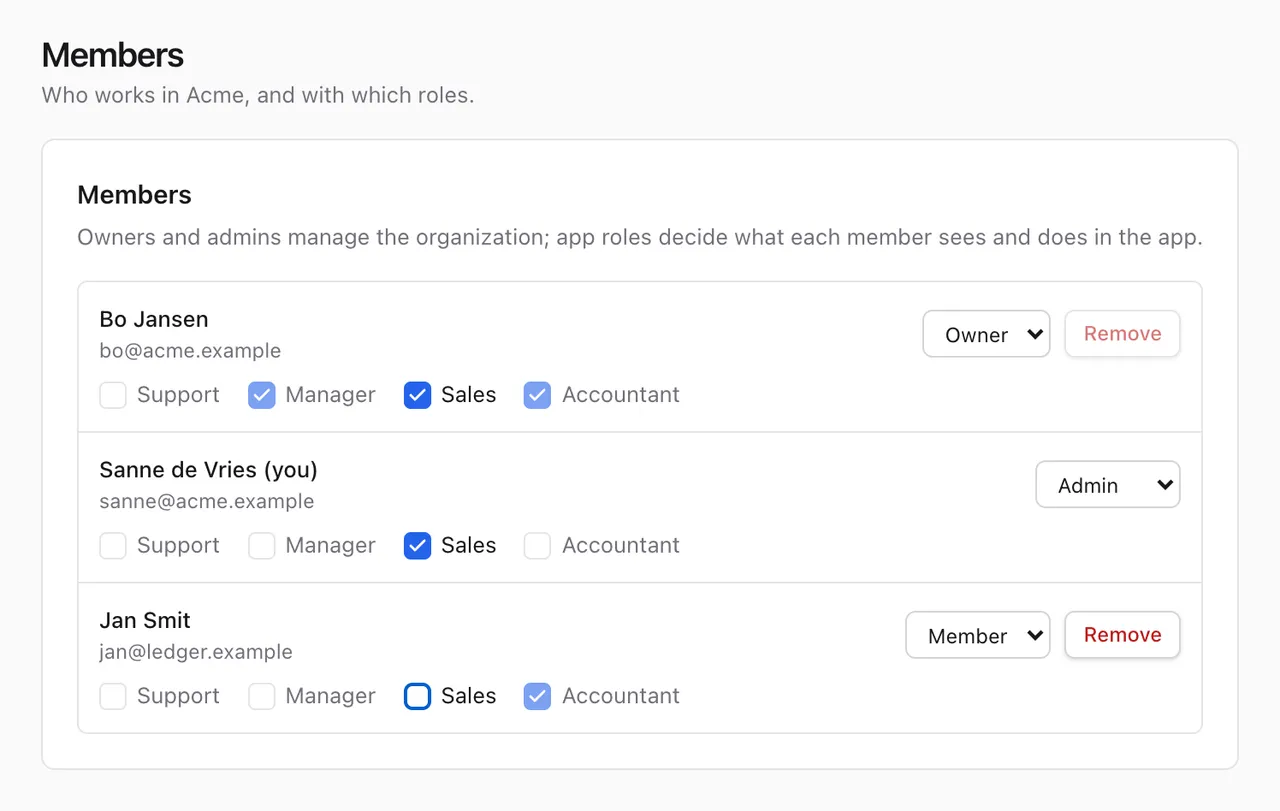
- Organizations are optional: owners, admins and members, plus app roles per membership.
- Invitations by email stay valid for seven days, and an owner can hand ownership over.
- A resource marked as tenant-scoped limits every query to the caller’s organization.
- Deleting an organization that still has records is refused, unless you configure it to cascade.
Staff sign-in
Helping someone, with guardrails
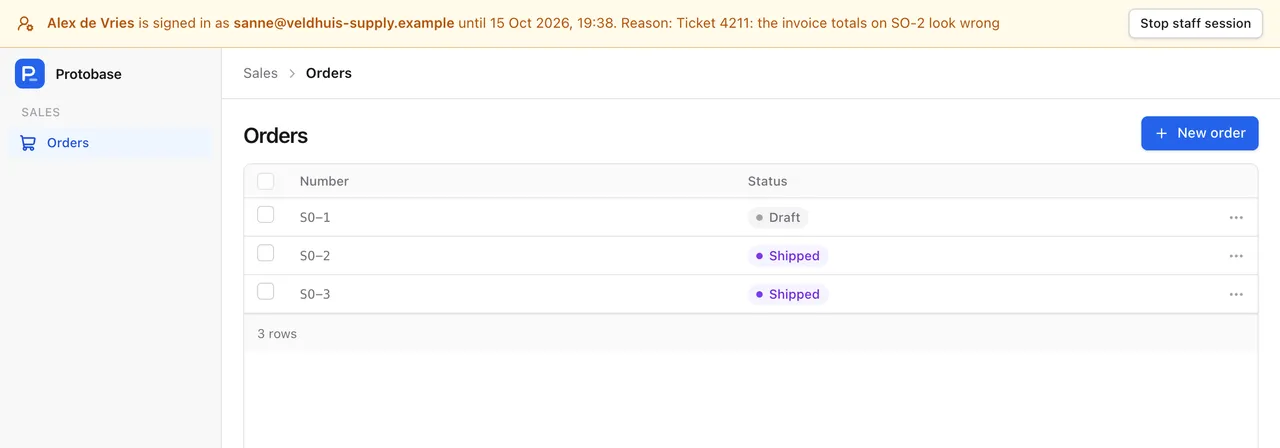
The team that hosts an app can sign in as one of its users to help them, under strict rules.
- Staff sign in through the operator’s own identity provider, with a required group and a second factor from the last 15 minutes.
- They write down a reason of at least 10 characters, and the session lasts 30 minutes, never extended.
- Staff cannot change sign-in settings, every staff sign-in is logged, and the app shows a banner while it lasts.
- Admins can switch staff sign-in off, or have the person emailed each time.
In the API
Safe defaults on every request
Transactions
Every request runs in a transaction with a time limit, 15 seconds by default. Reads run read-only.
No lost updates
Every record carries an ETag. An update needs the current one, and a stale one is refused.
No runaway queries
A query that would scan a large table is refused, with the index that would fix it.
Safe uploads
File types are detected from the content, HTML and SVG are never treated as images, and downloads are served so a browser cannot run them.
Tokens
Signed tokens last 15 minutes. No web address hands one out; the CLI does, for up to a day.
Rate limits
Sign-in routes are rate limited. A public API has no limiter of its own, so put a proxy or CDN in front of it.
Start with the database you have
Install the CLI, describe your tables and run the admin on your own machine. Protobase never migrates your database by itself.
Your back office, live in a few minutes
Sign up with GitHub or email, pick a starting point, and ask the assistant for what you need.
Start in the cloudEarly access Plans from €0.99 a month.