The AI assistant
Changes you ask for, in steps you approve
In Protobase Cloud the assistant plans each change, shows you its price, and runs it only when you approve. In the open-source framework you connect your own model. And your coding agent can learn Protobase from the docs.
Early accessSign up with GitHub or email. Your first app is live in a few minutes. Plans from €0.99 a month.
Or self-host it for freeIn Protobase CloudEarly access
Every change is a task you approve
Because your app is a short description, a change is a small diff. The assistant works on that description, and every change passes the same checks before it goes live.
- 01
Ask
Ask in plain words, in the console or inside your app. In the app, users with the admin or ai role can ask; the owner can switch that off or block a person.
- 02
Plan
The assistant reads your app’s code and live schema and comes back with a plan and a price. It may ask you questions first, with screenshots, and a plan can be revised.
- 03
Approve
Approve the plan, send it back with notes, or decline it. Nothing changes before you approve.
- 04
Check
The change runs in a throwaway container and has to pass typecheck, tests, the build and
protobase doctor, with up to two rounds of automatic fixes. - 05
Deploy
It is committed and deployed. Database changes are new numbered migration files, tried first and applied in one transaction while writes pause. If the deploy fails, the old version keeps serving.
- 06
Accept
You accept the result. To undo something, ask for a follow-up change.
What it will not do
- It cannot approve, spend credits or deploy by itself: only a click on the task card does.
- A change too large for one plan is refused, with a suggestion to split it.
- Changes to data go through a task too, like changes to the app.
- Each app has one task queue, oldest first, and its tasks also show inside the app.
Questions
It answers questions too
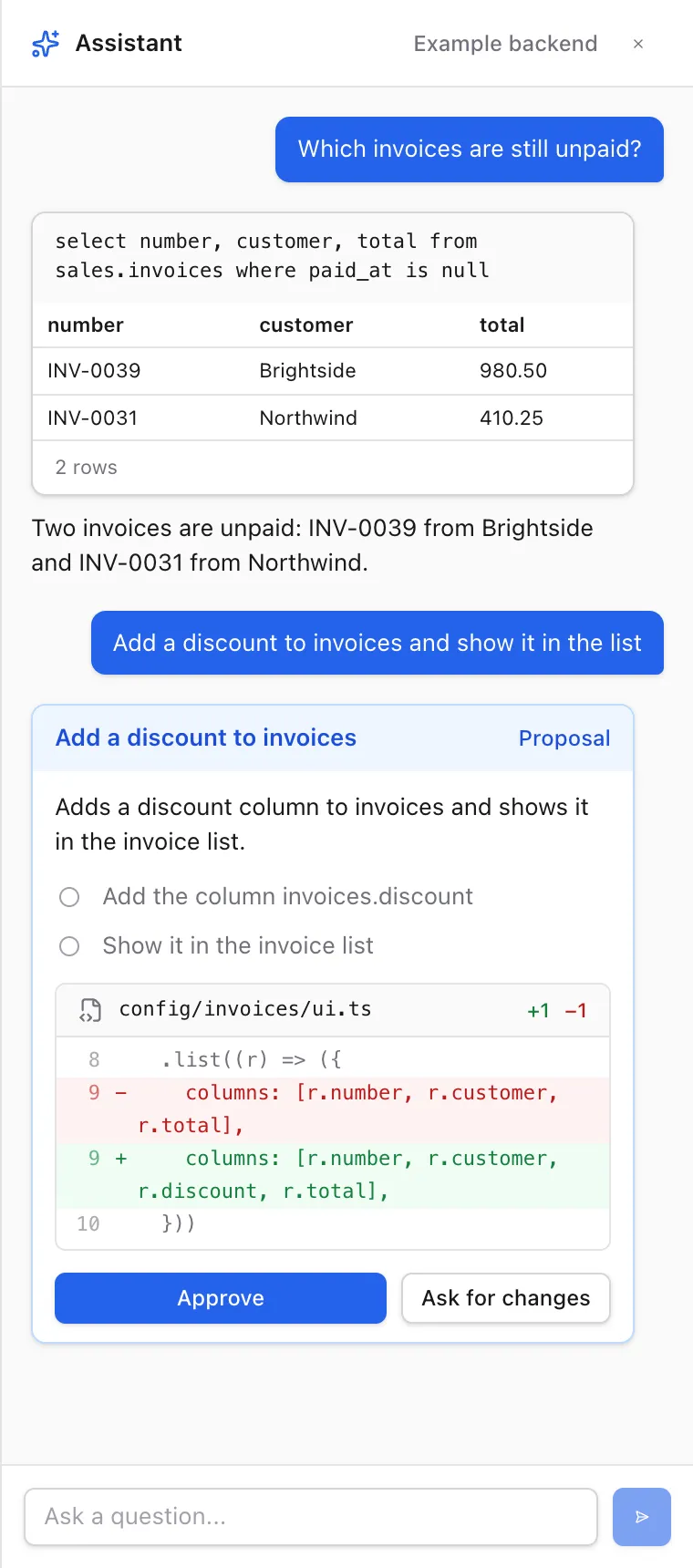
Ask about your data, and the assistant answers with read-only SQL, as tables of at most 200 rows. Ask about Protobase, and it answers from the published docs.
Cost
You see the price before it runs
See how credits work on the pricing page.
Planning is free
You see the plan and its price before anything runs.
Failures cost nothing
A change that fails or hits its limit costs nothing; database changes it already applied stay live.
Credits come with every plan
Every plan includes monthly credits for the assistant.
In the open-source framework
Your own model, in your own admin
Turn it on by setting one environment variable to your model’s API key. Read how the assistant works.
- An Assistant button opens a chat beside the page, for users with the admin or ai role.
- Bring your own model key: OpenRouter by default, or any OpenAI-compatible endpoint with tool calling, such as OpenAI, a gateway, Ollama or vLLM. The framework includes no model.
- It answers with one read-only query at a time: at most 200 rows and 5 seconds, in a transaction that is always rolled back.
- It proposes inserts, updates and deletes on a card with Approve and Reject. Only Approve runs them, and after 10 minutes without an answer nothing runs.
- Those two SQL tools run as the app’s database role, outside the access rules, as the docs state. Tools you define with
defineToolact as the user, through the rules. - Answers can hold text, tables, cards with steps, diffs and buttons, and live widgets from your plugins. Any backend that speaks its protocol can take the built-in one’s place.
For your coding agent
Docs your coding agent can read
An Agent Skill
The docs are published as an Agent Skill. Copy it into your agent’s skills folder, for example
.claude/skills/protobase/.Kept in step
The skill is generated from the docs, and CI fails when it falls behind.
Docs as Markdown
Every docs page is also served as Markdown, at its address plus
.md.Code that compiles
Every code sample in the docs is type-checked and tested in the repository.
Start with the database you have
Install the CLI, describe your tables and run the admin on your own machine. Protobase never migrates your database by itself.
Your back office, live in a few minutes
Sign up with GitHub or email, pick a starting point, and ask the assistant for what you need.
Start in the cloudEarly access Plans from €0.99 a month.