Skip to content

Open-source admin framework for Postgres

Described by you. Maintained by Protobase.

Protobase turns a Postgres database into an admin app your team can work in: lists, filters, record pages, roles and an API. You own a short description of your tables, in your own repository. Protobase runs, secures and updates everything around it.

Start in the cloud

Early accessSign up with GitHub or email. Your first app is live in a few minutes. Plans from €0.99 a month.

Or self-host it for free
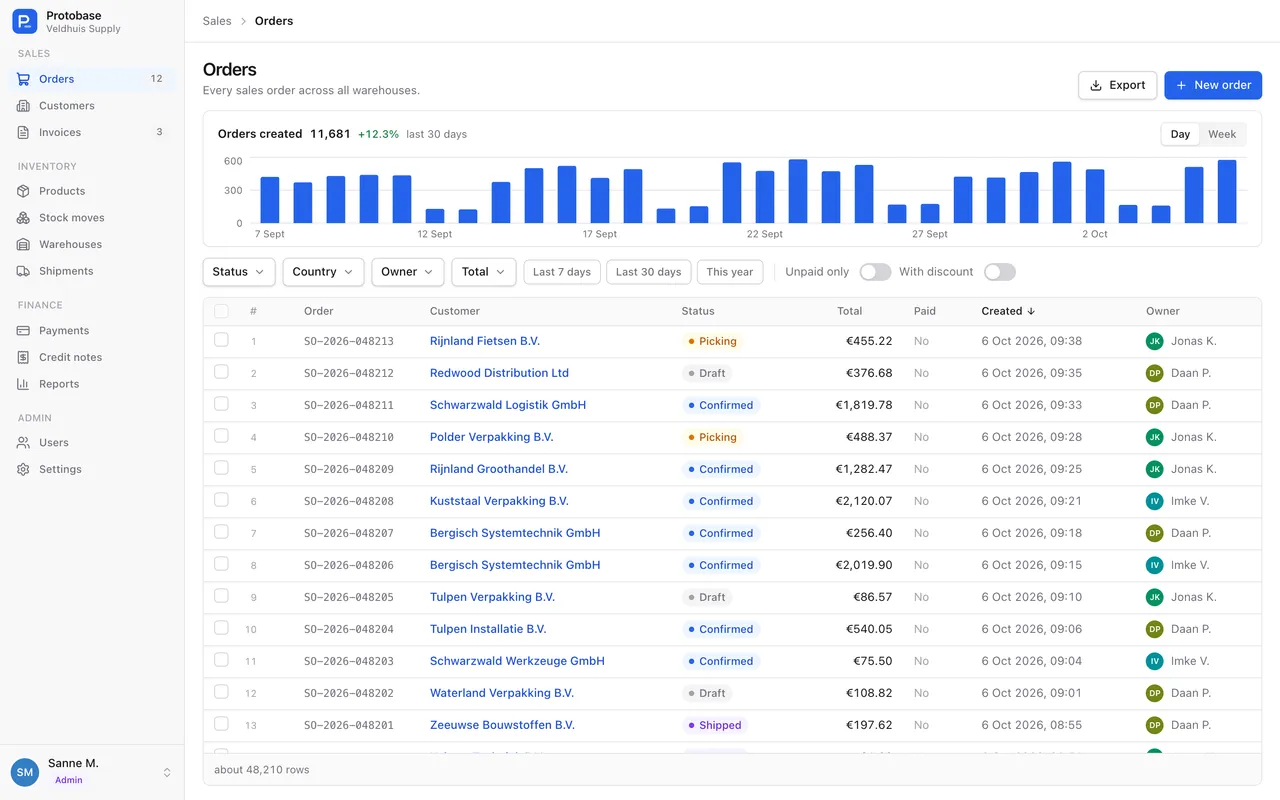
The Protobase admin app with a list of orders: a chart of orders per day, filters for status, country, owner and total, and a sidebar grouped into sales, inventory, finance and admin.
Orders in the ERP example, one of the apps you can start from in Protobase Cloud.

Protobase CloudEarly access

Your app is live in a few minutes

Nothing to install. Sign up, pick a starting point, and change the app by asking for what you need.

  1. 01Sign up with GitHub or with your email address.
  2. 02Pick a first app: an ERP, a real estate app, or an empty one.
  3. 03Choose where the code lives: a new private GitHub repository, or with Protobase.
  4. 04Your app goes live with its own Postgres database, and you are signed in.
  5. 05Ask the assistant for a change. It shows a plan and a price, and nothing changes until you approve.

Why Protobase

A back office without a second app to maintain

Teams that keep their data in Postgres need a place to find, fix and follow up on records, without moving the data or writing an app. The usual ways to get one each leave something behind.

  • Build it yourself

    and maintain the app, the API and sign-in for as long as you use them.

  • Rent a hosted builder

    and the app lives inside someone else’s product.

  • Generate it with AI

    and the generated code becomes yours to maintain.

  • Describe it with Protobase

    Your part stays a short description in your own repository. Protobase runs, secures and updates the rest.

01Described by you

Two short files describe your app

data.ts says what your tables are: fields, keys, relations, rules and who may read what. ui.ts says how each role sees them: columns, filters, record pages and buttons. Both are plain TypeScript in your own repository.

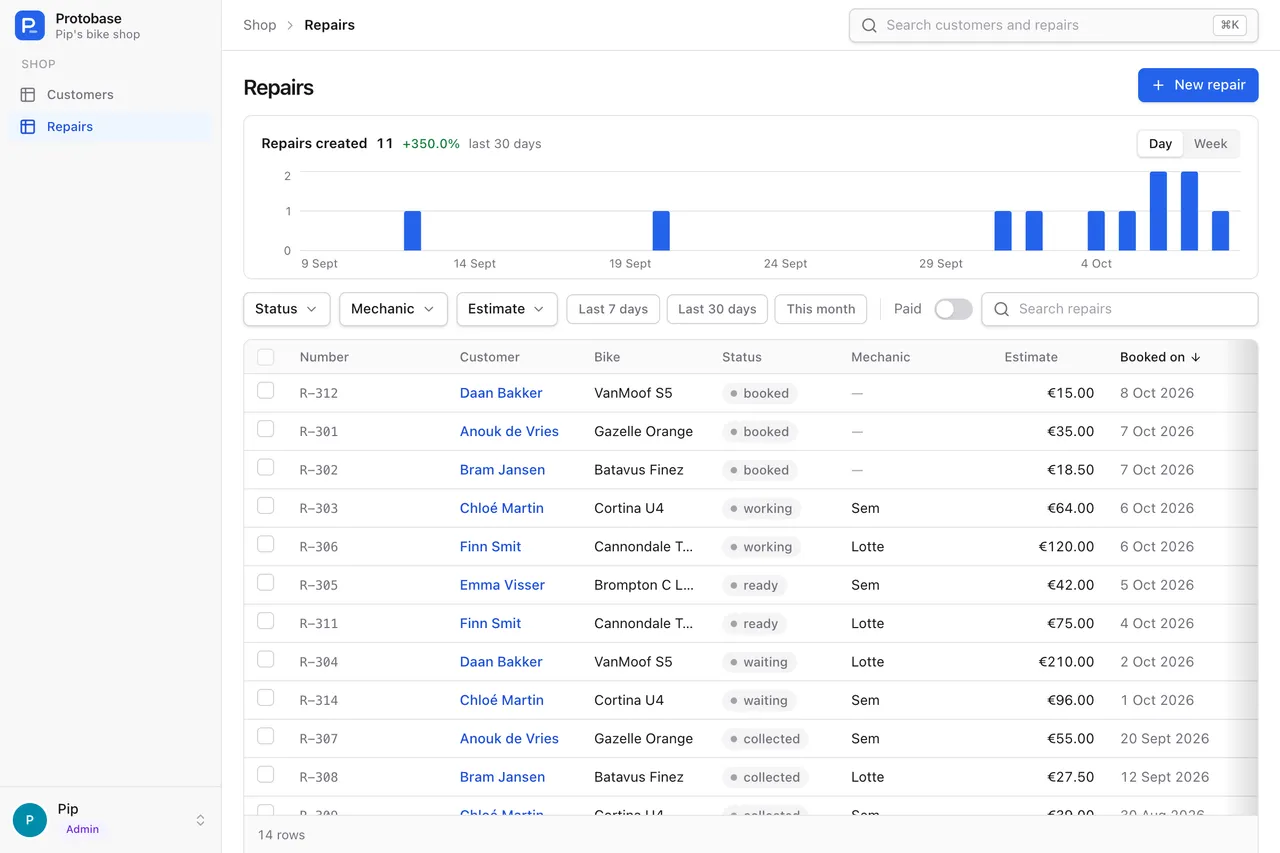
A list of bike repairs in the Protobase admin app, with a chart of repairs per day and filters for status, mechanic, estimate, dates and paid.
What those two files give Pip’s bike shop: the repairs, with filters and a chart.
import { f, resource } from '@protobase/schema'

/** shop.repairs, described as it is */
export const repairs = resource('repairs')
  .table('shop.repairs')
  .fields({
    id: f.integer().readOnly().filterable().sortable().dbDefault(),
    number: f.text().readOnly().filterable().sortable().dbDefault(),
    customer_id: f.relation('customers').filterable().sortable(),
    bike: f.text(),
    problem: f.text(),
    status: f
      .enum(['booked', 'waiting', 'working', 'ready', 'collected'])
      .default('booked')
      .filterable()
      .sortable(),
    mechanic: f.text().optional().filterable().sortable(),
    estimate: f.decimal({ precision: 8, scale: 2 }).filterable().sortable(),
    paid: f.boolean().default(false).filterable(),
    booked_on: f.date().filterable().sortable(),
    // The column keeps its old name.
    notes: f.text().optional().column('internal_notes'),
    // An old column, left out on purpose.
    legacy_ref: null,
  })
  .primaryKey((r) => r.id)
  .validate((repair) =>
    repair.status === 'collected' && !repair.paid
      ? [{ field: 'paid', message: 'A bike leaves the shop paid' }]
      : undefined,
  )
import { view } from '@protobase/schema'
import type { repairs } from './data'

export const repairsView = view<typeof repairs>('repairs')
  .names({ singular: 'Repair', plural: 'Repairs' })
  .title((r) => r.number)
  .fields((r) => ({
    number: r.number.format('code'),
    customer_id: r.customer_id.label('Customer'),
    status: r.status.format('badge'),
    estimate: r.estimate.prefix('€').decimals(2),
  }))
  .list((r) => ({
    columns: [
      r.number, r.customer_id, r.bike, r.status,
      r.mechanic, r.estimate, r.booked_on,
    ],
    sort: [[r.booked_on, 'desc']],
    search: [r.number, r.bike],
  }))
  .filters((r, w) => [
    w.facets(r.status),
    w.facets(r.mechanic, { search: true }),
    w.dateRange(r.booked_on, { presets: ['7d', '30d', 'month'] }),
    w.range(r.estimate, { histogram: true }),
    w.toggle(r.paid),
  ])
  .chart((r) => ({ field: r.booked_on, range: '30d', granularity: 'day' }))
  • Written for you

    protobase scaffold reads the database catalog and writes both files from your real tables.

  • Checked against your database

    protobase doctor finds missing columns, types that no longer fit and filters that would need an index.

  • Pages are data too

    A dashboard is JSX that compiles to plain data, so there are no endpoints to write and no React to maintain.

How it works Follow the bike shop from a table to an admin

02Maintained by Protobase

Everything else is maintained for you

Protobase maintains the admin app, the API and the server. As your app moves to newer releases, it gets their fixes and features, and your plugins keep working without changes.

  • The admin app

    Lists with filters and charts, record pages, cards and maps, global search, saved searches, dark mode and a layout for phones.

  • A REST API

    Following Google’s API design guides, with OpenAPI 3.1, a typed client, ETags and batch writes.

  • Access rules

    Per operation, per field and per row, checked by the server on every request.

  • Sign-in

    Passwords, emailed codes, passkeys, two-factor, GitHub and any OpenID Connect provider, with organizations and invitations.

  • Jobs, events and webhooks

    In your own Postgres: retries, cron schedules with time zones and signed webhooks, with no extra queue service.

  • Files and images

    Local disk or any S3-compatible bucket, with resized variants and a placeholder while images load.

  • Fast on big tables

    The API refuses queries that would scan a large table, and counts big tables from the planner’s estimates.

  • Plugins that keep working

    Your own React code builds against a plugin API that releases only add to. A plugin that crashes turns itself off, not the app.

The admin app API and data

03Changed safely

Every change is small, checked and approved

Because your app is a short description, a change is a small diff you can read. That holds whether you write it, your coding agent writes it, or the assistant in Protobase Cloud does.

A change in Protobase Cloud Early access

  1. 01

    Ask

    Ask for a change in plain words, in the console or inside your app.

  2. 02

    Plan

    The assistant reads your app’s code and live schema, and comes back with a plan and a price. It may ask you questions first.

  3. 03

    Approve

    Approve the plan, send it back with notes, or decline it. Nothing changes before you approve.

  4. 04

    Check

    The change runs in a throwaway container and has to pass typecheck, tests, the build and protobase doctor, with up to two rounds of automatic fixes.

  5. 05

    Deploy

    It is committed and deployed. Database changes are new migration files, tried first and applied in one transaction. If a deploy fails, the old version keeps serving.

  6. 06

    Accept

    You accept the result, or ask for a follow-up change.

The assistant cannot approve, spend credits or deploy by itself: only your click on the task does. A change too large for one plan is refused, with a suggestion to split it.

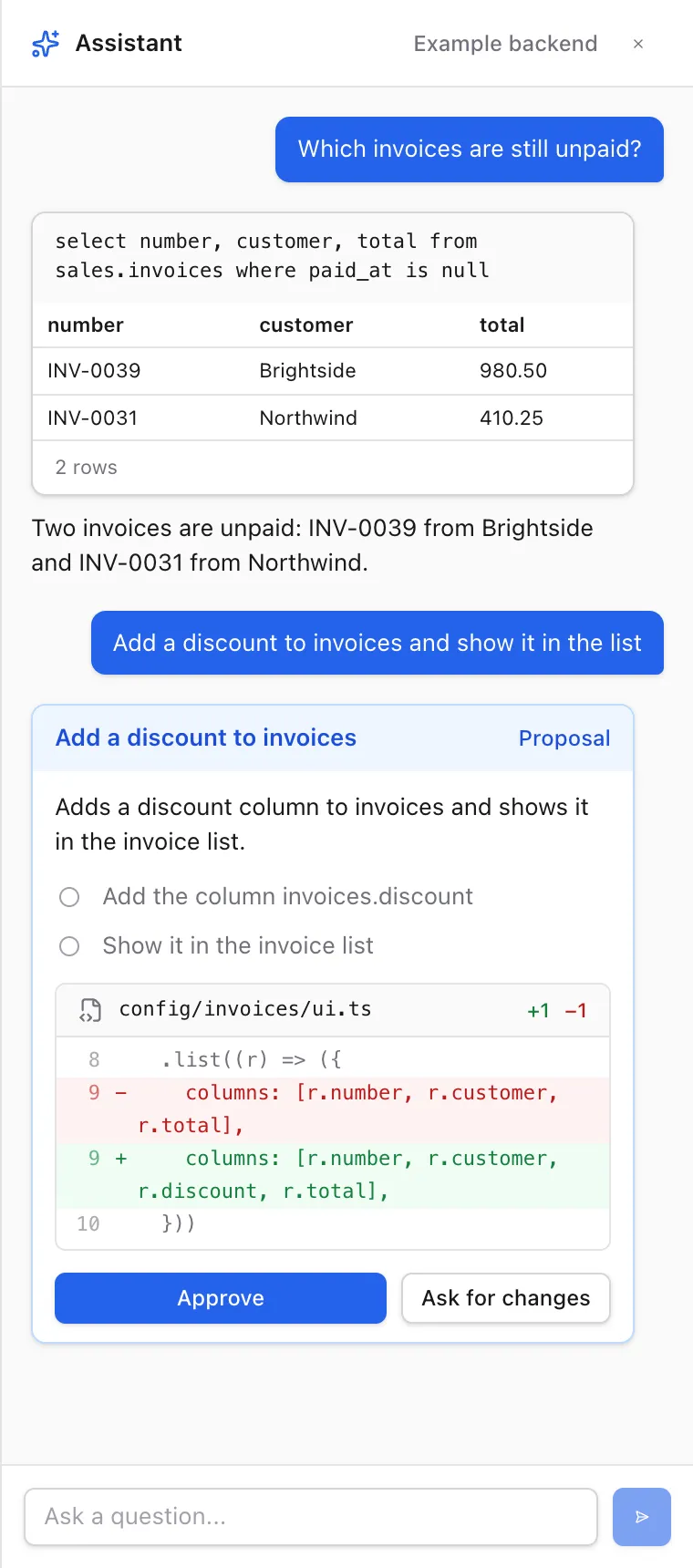
The assistant panel in the Protobase admin: a question about unpaid invoices answered with a query result table, and a proposed change shown as a diff with Approve and Ask for changes buttons.
The assistant answers with tables and proposes changes on a card you approve.

The AI assistant Also in the open-source framework, with your own model, and for your coding agent.

Access and security

Who may see what is decided on the server

  • Rules per operation, per field and per row, kept in data.ts next to the fields they protect.
  • The server checks them on every request, in the API and in every block of a composed page.
  • Passwords, emailed codes, passkeys, two-factor, GitHub and any OpenID Connect provider are built in.
Access and security

Made for Postgres

Built for the database you have

  • Composite and text keys, quoted uppercase legacy tables, SQL views and generated columns, described as they are.
  • Queries that would scan a large table are refused, with the index to add.
  • Jobs, events and webhooks live in your Postgres, and writes from psql and other services count too.
API and data
  • 10,000,000

    stock moves in the largest seed of the ERP example

  • 433,000

    photos in the property portal example, each with resized variants

  • 500

    writes in one batch, in a single transaction

Two ways to run it

Run it yourself, or let us run it

The same framework and the same runtime, either way.

Open source

Free, under Apache-2.0

  • protobase build writes one folder: the config, the admin app and a manifest. The build needs no secrets and no database.
  • Serve it with one runtime file of about 3 MB on Bun, with protobase serve, or with the Docker image for amd64 and arm64.
  • Your web host serves the admin app itself and sends only /api to the runtime, so loading the UI never needs a running container.
  • The image runs as a non-root user on a read-only file system, with a health check.

Protobase Cloud Early access

From €0.99 a month

  • Each app gets its own Postgres database and a least-privilege role.
  • Keep the code in GitHub, and every push deploys.
  • Protobase updates arrive on the schedule you choose: right away, weekly or by hand.
  • The assistant works in the console and inside your app.

Questions

What people ask first

Does Protobase change my database?

No. Protobase describes your tables as they are and never migrates anything by itself. The CLI reads your database in a read-only session. The tables Protobase needs for sign-in, jobs, events and webhooks come as SQL migration files in your project, and you decide when to run them.

Which databases does it work with?

Postgres only. The examples, tests and CI run on Postgres 18, and the tests also run on PGlite.

What happens to my own code when Protobase updates?

Your own React code is a plugin, built against Protobase’s plugin API. Releases add to that API but never break it, so a plugin keeps loading on newer releases without changes. A plugin that does not fit or crashes turns itself off, and the rest of the app keeps working.

How stable is it?

Protobase is young and before 1.0. Until 1.0 a minor version may change the config format, and you rebuild your bundle for it. The plugin API is the stable promise, below 1.0 too. Every release passes type checks, unit, integration and end-to-end tests, and a browser check of every docs page.

Who decides what people can see?

Your access rules, kept in data.ts and enforced by the server on every request: per operation, per field and per row. Once you define roles, anything not granted is denied. Sign-in comes with passwords, emailed codes, passkeys, two-factor, GitHub and any OpenID Connect provider.

Can I move off Protobase Cloud later?

Your app’s code can live in your own GitHub repository, and it is an ordinary Protobase project: cloud apps are built with protobase build and run on the same open-source runtime you can run yourself.

Do I need my own AI model key?

Not in Protobase Cloud: the assistant is part of every plan. In the open-source framework you bring your own key, for OpenRouter or any OpenAI-compatible endpoint, including Ollama and vLLM.

Which languages does the admin speak?

English. The built-in screens have no translations, and numbers and dates use fixed European formats.

Your back office, live in a few minutes

Sign up with GitHub or email, pick a starting point, and ask the assistant for what you need.

Start in the cloud

Early access Plans from €0.99 a month.