How it works
From your tables to a maintained admin app
You describe your Postgres tables, and who may see what, in short TypeScript files in your own repository. Protobase reads that description and serves the admin app, the API and sign-in from one runtime.
Early accessSign up with GitHub or email. Your first app is live in a few minutes. Plans from €0.99 a month.
Or self-host it for freeTwo parts
What you write, and what Protobase maintains
Your part is a description. Protobase’s part is everything that turns it into a working app and keeps it working.
You write
data.ts- What your tables are: fields and their types, keys, soft delete, tenants, access rules and events.
ui.ts- How each role sees them: names, list columns, filters, a chart, the record layout and buttons.
- Composed pages
- Dashboards written as JSX that compiles to plain data, built from 14 blocks.
- Plugins, if you need them
- Your own React code for list displays, field types, record sections and actions.
Protobase maintains
- The admin app
- One prebuilt app, the same for every project on a release.
- The REST API
- A Hono app following Google’s API design guides, with OpenAPI 3.1 and a typed client.
- Sign-in and access
- Passwords, passkeys and two-factor, and access rules checked on every request.
- Jobs, events and webhooks
- Kept in your own Postgres, with retries and schedules.
- The runtime
- One bundle, served by the protobase command, a single runtime file or a Docker image.
You write
- data.ts
- ui.ts
- pages
- plugins
Protobase maintains
- admin app
- REST API
- access rules
- sign-in
- jobs
- events
- webhooks
- files
- assistant
Your Postgres database
Tables as they are
The description
Two short files for a table
This is the docs’ bike shop: a repairs table that a booking site writes to, described as it is, and the list the front desk gets from it.
import { f, resource } from '@protobase/schema'

/** shop.repairs, described as it is */
export const repairs = resource('repairs')
  .table('shop.repairs')
  .fields({
    id: f.integer().readOnly().filterable().sortable().dbDefault(),
    number: f.text().readOnly().filterable().sortable().dbDefault(),
    customer_id: f.relation('customers').filterable().sortable(),
    bike: f.text(),
    problem: f.text(),
    status: f
      .enum(['booked', 'waiting', 'working', 'ready', 'collected'])
      .default('booked')
      .filterable()
      .sortable(),
    mechanic: f.text().optional().filterable().sortable(),
    estimate: f.decimal({ precision: 8, scale: 2 }).filterable().sortable(),
    paid: f.boolean().default(false).filterable(),
    booked_on: f.date().filterable().sortable(),
    // The column keeps its old name.
    notes: f.text().optional().column('internal_notes'),
    // An old column, left out on purpose.
    legacy_ref: null,
  })
  .primaryKey((r) => r.id)
  .validate((repair) =>
    repair.status === 'collected' && !repair.paid
      ? [{ field: 'paid', message: 'A bike leaves the shop paid' }]
      : undefined,
  )
import { view } from '@protobase/schema'
import type { repairs } from './data'
export const repairsView = view<typeof repairs>('repairs')
.names({ singular: 'Repair', plural: 'Repairs' })
.title((r) => r.number)
.fields((r) => ({
number: r.number.format('code'),
customer_id: r.customer_id.label('Customer'),
status: r.status.format('badge'),
estimate: r.estimate.prefix('€').decimals(2),
}))
.list((r) => ({
columns: [
r.number, r.customer_id, r.bike, r.status,
r.mechanic, r.estimate, r.booked_on,
],
sort: [[r.booked_on, 'desc']],
search: [r.number, r.bike],
}))
.filters((r, w) => [
w.facets(r.status),
w.facets(r.mechanic, { search: true }),
w.dateRange(r.booked_on, { presets: ['7d', '30d', 'month'] }),
w.range(r.estimate, { histogram: true }),
w.toggle(r.paid),
])
.chart((r) => ({ field: r.booked_on, range: '30d', granularity: 'day' }))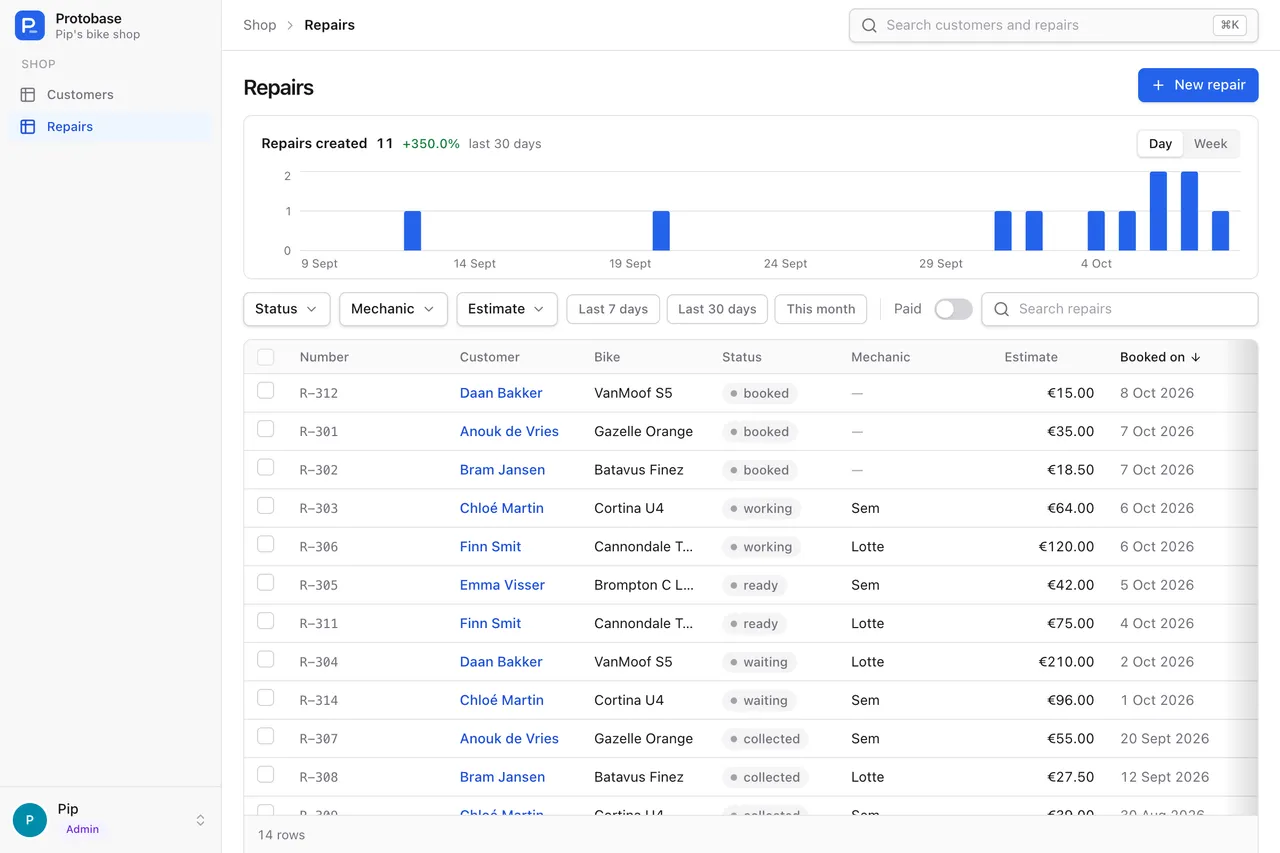
resource('repairs').table('shop.repairs')names a table as it is, in whatever schema it lives.- 13 field types, from
f.text()andf.decimal()to relations, currencies, countries and files. legacy_ref: nullleaves a column out on purpose, and.column()keeps an old column name..validate()holds a record rule, and buttons save through the same API as the Save button, so the rule applies to them too.- Views are immutable builders: every method returns a new view, and
.forRoles()gives a role a view of its own.
The workflow
Five commands from database to running app
The protobase command comes with @protobase/cli and runs on Node 22.12 or later, or on Bun.
- 01
Describe
protobase scaffold <connection string> --uireadspg_catalogin a read-only session and writesdata.tsandui.tsfor each table. Indexed columns become filterable and sortable. Running it again only adds missing columns, and--dry-runprints a diff instead. - 02
Check
protobase doctorchecks every resource against the database: missing tables or columns, types that no longer fit, tables without a usable key, enum values that drifted, and filters that need an index, with theCREATE INDEXto add. - 03
Develop
protobase devserves the admin app and the API on one port and reloads server code, configs, layouts and UI without a restart. Jobs run in the same process, sign-in is real, and the API reference is at/api/docs. - 04
Build
protobase buildwrites one folder: the config module, the admin app with your UI as plugins and your theme, and a manifest. The build needs no secrets and no database. - 05
Serve
protobase serve, the single runtime file on Bun, or the Docker image runs the API. Your web host serves the admin app itself and sends only/apito the runtime.
Why a description
Why a description, and not generated code
Generated code is yours to maintain from the day it is written. A description stays small, and Protobase keeps running everything around it.
It can be checked
protobase doctorcompares the description with the real database, and the API refuses queries that would scan a large table.It can be secured
Access rules sit in the description, and the server applies them on every request: in the API, in every block of a composed page, and in the API description each user receives.
It can be upgraded beneath you
Protobase maintains the admin app, the API and the server. Releases add to the plugin API but never break it, so your React code keeps loading.
It can be changed safely
A change is a small diff to typed files. In Protobase Cloud it is planned, priced, approved by you and checked before it deploys.
What stays stable
Young, and said plainly
Protobase is before 1.0. Until then a minor version may change the config format, and you rebuild your bundle for it; a runtime serves only bundles of its own minor version.
The plugin API is the stable promise, below 1.0 too: releases add to it and never remove or change what is in it.
Every release passes type checks, unit, integration and end-to-end tests, a docs build with link checks and a browser check of every docs page. It ships to npm with provenance and to GitHub’s container registry for amd64 and arm64.
Start with the database you have
Install the CLI, describe your tables and run the admin on your own machine. Protobase never migrates your database by itself.
Your back office, live in a few minutes
Sign up with GitHub or email, pick a starting point, and ask the assistant for what you need.
Start in the cloudEarly access Plans from €0.99 a month.